
A web-based programming interface for the Yaesu FTH-2008/2009/7008/7009 series of handheld transceivers, using the Web Serial API.
This tool allows you to connect to your FTH-200X/FTH-700X series radio via a serial port adapter and read/write its configuration using a modern web browser. The application is completely client-side, without dependencies.
-
A modern web browser that supports the Web Serial API (Chrome, Edge, or Opera)
-
A RS232 USB-to-serial adapter with a programming cable suitable for your radio model
-
If are unable to find the right cable, you can build it yourself:
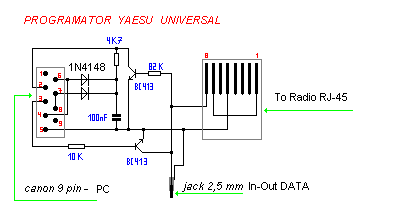
-
-
The FTH-2008, FTH-2009, FTH-7008, or FTH-7009 handheld transceiver
- Connect your radio to your computer using a serial adapter
- Open the application in a supported browser
- Click "Connect to Serial" and select your serial port
- Put your radio in clone mode according to the radio's manual
- Use the "Read from Radio" button to retrieve the current configuration
- When prompted, press PTT button ONCE to start data transfer
- Edit the configuration as needed
- Use the "Write to Radio" button to send the updated configuration
- When prompted, press and HOLD the RES/MON button until display shows "LOAd"
- Alternatively, you can use the "Read from File" and "Write to File" buttons to load/save configurations from/to your local filesystem
Important Notes:
- DO NOT WRITE FILES THAT ARE NOT BASED ON YOUR PREVIOUSLY READ CONFIGURATION FILES. Some unit-specific parameters are factory-written and may not be compatible with other units. Before saving a new configuration, make sure it was edited from a configuration coming from the same unit.
- You must successfully connect to the serial interface before you can write to the radio
- Both Read and Write buttons are disabled when there's no active serial connection
- The radio only works with a baud rate of 9600, mind this when selecting your serial interface
The Web Serial API is currently supported in:
- Google Chrome (version 89+)
- Microsoft Edge (version 89+)
- Opera (version 76+)
It is not supported in Firefox or Safari.
This project is a pure client-side application with no build steps. It uses:
- Vanilla JavaScript
- Web Serial API
- TailwindCSS (via CDN)
MIT
The radio communication logic was ported from the original work by Wim Lewis in the FTH-2008 tools (rwconfig.c and fth2008.py).